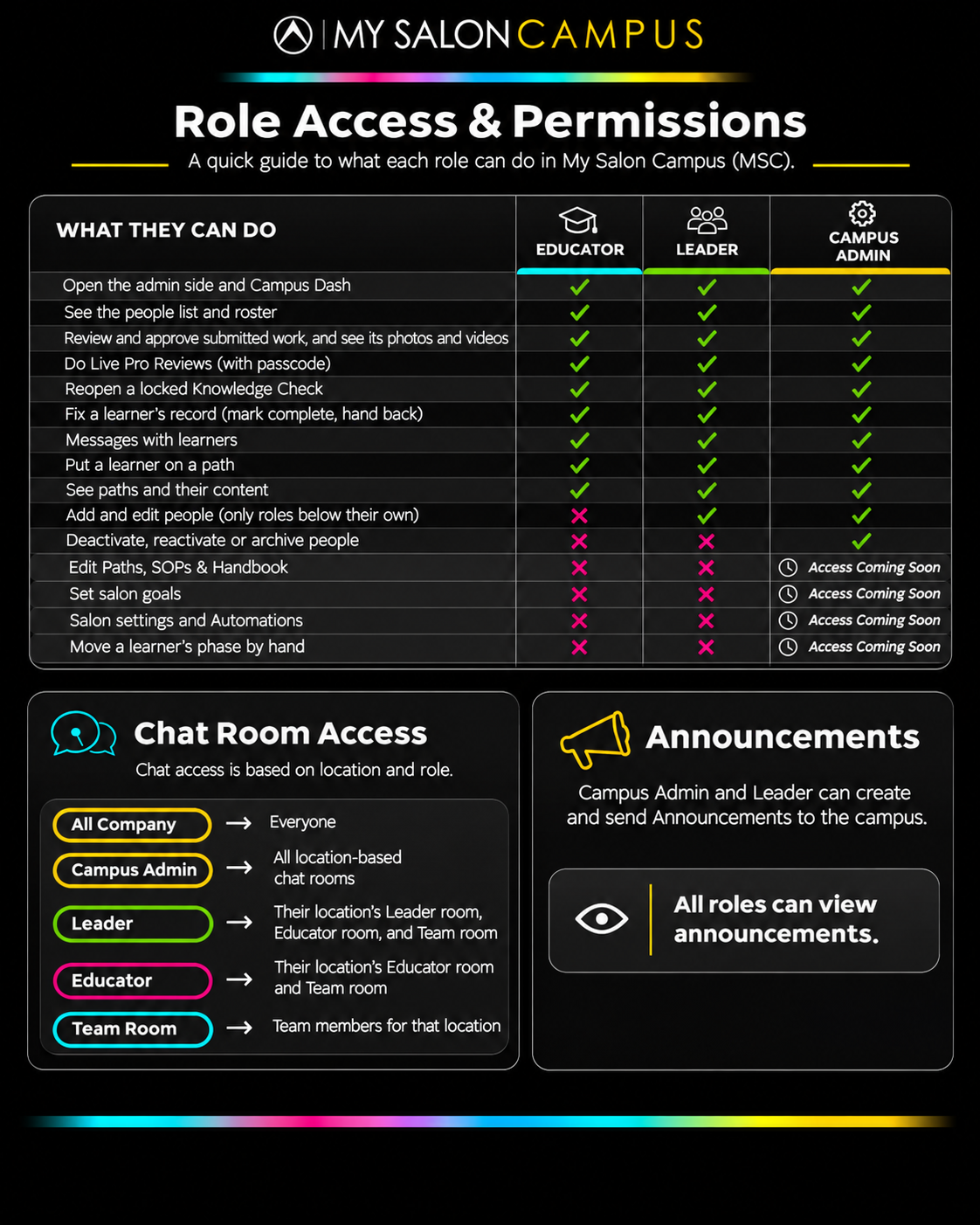
A quick guide to what each role can do in My Salon Campus (MSC).
| What they can do | Educator | Leader | Campus Admin |
|---|---|---|---|
| Open the admin side and Campus Dash | |||
| See the people list and roster | |||
| Review and approve submitted work, and see its photos and videos | |||
| Do Live Pro Reviews (with passcode) | |||
| Reopen a locked Knowledge Check | |||
| Fix a learner's record (mark complete, hand back) | |||
| Messages with learners | |||
| Put a learner on a path | |||
| See paths and their content | |||
| Add and edit people (only roles below their own) | |||
| Deactivate, reactivate or archive people | |||
| Edit Paths, SOPs & Handbook | Coming soon | ||
| Set salon goals | Coming soon | ||
| Salon settings and Automations | Coming soon | ||
| Move a learner's phase by hand | Coming soon |
Coming soon = on its way for Campus Admins.
Chat access is based on location and role.
Campus Admins and Leaders can create and send announcements to the campus.